


We are not SURI.
We are not a service centre and do not repair or replace toothbrushes.
Whilst we will offer what support we can, we cannot provide answers to all issues or problems you might be experiencing with a SURI product.
Contacting SURI directly will always be your best option, but if your question is not answered below, do feel free to leave a comment.
Failing that, visit SURI’s contact page or email [email protected]
Our SURI reviews
SURI is a brush that we rate highly in our best electric toothbrush recommendations and reviews.
If you are simply researching SURI rather than looking for FAQs, you may find our other posts useful:
FAQ introduction
This article answers some of the common questions we receive about using SURI electric toothbrushes and the faults experienced in daily use.
All being well, in the sections below you will find the answer you need to resolve the issue.
If consulting this page or the user manual for your product does not resolve the issue, or you determine the brush requires repair or replacement, contact SURI by emailing [email protected]
The SURI 1.0 and 2.0 come with a 1 year warranty as standard, whilst the 2.0 can be extended to 2 years (for free) by registering it. Provided the fault falls under warranty terms, it should be resolved for you. In most cases, this will be a free of charge repair or replacement.
Products outside of the warranty period will not be eligible for free repair or replacement by SURI. However, unlike many other toothbrush brands, they are equipped to offer affordable, chargeable repairs for things like battery replacement.
My SURI brush head is stuck/won’t come off the handle
The original SURI 1.0 has a very tight fitting brush head arrangement. Removing it does require a tighter grip and more force than is typically expected. The 2nd generation 2.0 model is easier to remove. However, it is possible, although rare, that it might be stuck for other reasons.
The best option is to run the top of the handle under warm water for a minute or so. Doing so typically causes any debris, such as dried toothpaste grime, to loosen and then makes it easier to remove the brush head.
There’s a gap between the brush head and handle. Is this normal?
Yes.
It is an intentional design feature. The gap should typically be 1-2mm. More than that and it might be an indication the head is not fitted correctly or there is another problem.
The gap ensures the head and the handle don’t touch. If they did, it could impact the cleaning experience delivered by the sonic vibrations and over time wear out the motor inside the handle.
What does the white light on a SURI toothbrush mean?
A solid white light on a SURI toothbrush handle is an indication that the gentle clean mode is active.
A flashing or pulsing white light is a sign that the toothbrush is being charged.
You may also get a solid white light on the handle when the brush is on charge and the battery has reached 100% capacity.
What does the blue light on a SURI toothbrush mean?
A solid blue light on the handle of the SURI 1.0 or 2.0 signals that the more powerful deep clean (V2.0) or polish mode (V1.0) is active.
What does the red light on a SURI toothbrush mean?
A red light, normally flashing, is a signal that the battery inside the SURI handle is low on power or is flat and in need of a recharge.
My SURI toothbrush has an orange light. What does this mean?
If you have a solid orange or flashing orange light on a SURI toothbrush, this means that the travel lock on SURI 2.0 is enabled.
The travel lock prevents the toothbrush from being accidentally activated, when in transit, for example.
Press and hold the power button for 5 seconds to turn it off.
This travel lock feature is available on the second generation handle only.
How to lock/unlock button (travel lock) SURI 2.0
The SURI S2 electric toothbrush features a travel lock mode.
This disables the power button. The normal quick press to turn the brush on will not work. This therefore prevents accidental activation of the brush when it is in a bag or pocket, for example.
To lock the toothbrush, press and hold the power button down for 5 seconds.
As you hold it, an orange light above the power button blinks. The travel lock is enabled when the handle vibrates and in turn, creates a beeping sound.
If you press the power button now, the brush won’t turn on, and an orange light will appear.
To unlock or remove this travel lock mode, press and hold down the power button for another 5 seconds. As you do this the light will blink orange. Once the lock has been deactivated, the handle will vibrate and create a beeping sound.
How does the pressure sensor work?
The pressure sensor is included with SURI 2.0 only.
When too much force is applied during a brushing session, the brush will let out 3 distinct vibrations and then stop the bristle movement entirely.
It results in a noticeable change of sound and alteration to the brushing sensation.
Only when the pressure is relieved will the motor begin working and the bristles begin moving again.
You can see an example of the pressure sensor in action in the video below:
How to turn on/off pressure sensor SURI S2
The SURI 2.0 electric toothbrush has a pressure sensor. When activated, this alerts you by vibrating the handle and stopping the brush head movements to protect your teeth and gums from damage as a result of brushing too hard.
It is enabled by default, but it is possible to turn this feature off, should you want to.
To turn the pressure sensor off, firstly press the power button to turn the brush on. It doesn’t matter which of the 2 modes you are in; you can still turn the sensor on and off.
Now, press and hold down the power button for 3 seconds. The brush handle will vibrate and emit a beeping sound. The light above the power button will flash once. The sensor is now off.
Now, regardless of the brushing mode selected, you will not get any alerts if you brush with too much force.
To turn the sensor back on and restore pressure alerts, press the power button to turn the toothbrush on. Now, press and hold down the power button for 3 seconds. The brush handle will vibrate and emit a beeping sound. The light above the power button will flash once.
What’s the warranty period for my brush?
SURI 1.0 comes with a 1 year warranty.
SURI 2.0 also comes with a 1 year warranty as standard. However, there is an option to extend it for free by registering it on https://www.trysuri.com/pages/warranty
A select number of SURI 1.0 owners who purchased the brush with a subscription before 30th June 2024 will have gotten a lifetime warranty.
The lifetime warranty ceases if there is any break in your subscription.
The handle is very loud
Both SURI 1.0 and 2.0 should operate at under 60 decibels. The typical noise range is between 50 and 60 decibels subject to mode and model.
If the noise is much louder or quieter, or significantly different to what you are used to, check the brush is charged and the head is attached correctly.
If this does not resolve the matter, consult with SURI’s support team. It may be a sign that the brush is not functioning correctly.
Toothbrush stutters regularly / pauses briefly
This is part of the 2 minute timer, also known as the pacer / quadpacer / 30 second timer.
A short stuttering noise reminds you at 30 second intervals to clean all four areas of your jaw (upper right, upper left, lower right and lower left) for the same amount of time (30 seconds).
The vast majority of electric toothbrushes include this feature — it’s one of the key features we recommend for our best electric toothbrush recommendations.
You can see an example of the timer in action in the video below:
SURI toothbrush handle turns itself on
No SURI toothbrush should ever turn itself on without you pressing the power button. If the toothbrush is turning itself on, without any interaction from you, then there is a fault with the handle that requires repair. Contact SURI.
SURI toothbrush turns off automatically
Both the 1.0 and 2.0 brush handles will power off automatically at the end of a 2 minute brushing cycle.
This is common on sonic toothbrushes as it acts as a clear signal that you have achieved the dentist recommended brushing time.
If it powers off before 2 minutes have been reached, then this is not normal behaviour.
If you want to brush for longer just turn the brush back on, but it will always power off again after 120 seconds of use.
The handle is not turning on/does not work at all
Assuming the brush is fully charged it is possible that the button on your brush has become stuck or malfunctioned.
Quite often, this is as a result of toothpaste residue. Try washing your toothbrush under warm water for a few minutes, giving it a few clicks as you do so.
The button on my toothbrush is sticking and makes a clicking sound
Sometimes the button can be a bit sticky and / or make more of a clicking sound than normal.
This can be caused by toothpaste residue building up around the button.
Try washing your toothbrush under warm water for a few minutes, giving it a few clicks as you do so.
But, despite what it might seem, SURI do allow quite a bit of tolerance in their button before they deem it faulty.
We experienced this ourselves. See video clip below. SURI support confirmed this is ok and not a fault.
The button on my toothbrush doesn’t work / is unresponsive
If you are not getting any response from the button on your SURI toothbrush, toothpaste residue may be preventing it from functioning correctly.
Try washing your toothbrush under warm water for a few minutes, giving it a few clicks as you do so.
Be sure to dry your toothbrush thoroughly with a towel or cloth and leave it to charge overnight, then try again.
SUR toothbrush settings - how can I change them?
SURI brushes have little in the way of settings.
Unlike some brushes, they are not smart and have no Bluetooth connectivity or smartphone apps.
You can change the brushing modes on the SURI 1.0 and 2.0.
The 2.0 offers a travel lock mode that can be turned on and off.
The 2.0 has a pressure sensor that can be turned on and off.
Both brushes have a timer and pacer that can’t be turned off or changed.
What cleaning modes are available on SURI brushes?
There are 2 brushing modes on each brush. They are as follows:
- SUIR 1.0
- Everyday clean - A great starting point, especially if you're new to sonic brushing or prefer a gentler clean
- Polish - A higher intensity clean for those that like a bit more power.
- SURI 2.0
- Gentle Care - A softer and less intense mode that is ideal for new electric toothbrush users or those wanting a gentler brushing experience
- Deep Clean - A higher powered and more intense mode for the more satisfying clean as it uses the full power of the brush motor
Essentially, they are the same modes, just renamed between the 2 models.
How to charge a SURI toothbrush?
SURI provides 2 different charging solutions for their electric toothbrushes.
The first and most conventional is the magnetic charging stand.
The second is the charging travel case.
The first generation (V1/1.0) SURI toothbrush relies on gold contact pins. These are located on the bottom of the handle, the charging stand and inside the travel case.
The newer 2nd generation (V2/2.0) uses inductive charging rather than pins.
You can’t charge the 1.0 on the 2.0 stand, in the case or vice versa.
Both charging stands have a USB cable hardwired into them. (Early S1 units did have a Type-C connector in the stand, with a detachable USB Type-A to Type-C cable. Technical issues meant that this was soon replaced.)
With the 1.0 the connector is a Type-A, whilst SURI 2.0 uses Type-C.
To charge the brush in a bathroom, or from a 3 pin socket, you will need to use the relevant adapter as this does not come in the box.
Both SURI V1 and V2 travel cases have a USB Type-C connector for charging. However, like the stand, V1 has a USB Type-C to Type-A charging cable compared to the Type-C to Type-C cable for V2.
Typically, it takes around 4 hours to charge the brush whilst in the case.
V1 takes around 3-4 hours to charge on its magnetic charging stand, whilst V2 takes up to 7 hours.
Does SURI remember the last used mode?
Yes, the brush will default to the last used brushing mode.
How long can I expect the battery in my SURI toothbrush to last?
Assuming the battery in your toothbrush is fully charged you can expect the following usage times.
- SURI 1.0 - 40+ days (I achieved 42 on average in my testing)
- SURI 2.0 - 1+ month (I achieved 38 days on average in my testing)
These usage times are a guide only and you may get slightly more or less depending on how you use the bush, but it should be close to this.
The above figures assume twice daily brushing for 2 minutes at a time.
If you brush more often or for longer, you should get the same usage time in total but you will need to recharge the brush more often.
Over years of use, the usable life may be reduced due to degradation in the battery.
There is no set time period for the battery to last. We would expect that you get 3-5 years, if not a bit more before it needs to be replaced.
Should it fail within the warranty period, the cost will be covered by SURI.
Outside of the warranty period, SURI offers affordable replacement services for the battery. You will need to contact them to arrange this.
Does the SURI case charge the brush?
Yes, but only when a USB power cable is attached.
Neither the travel case for the V1 or V2 has a battery inside that can replenish the toothbrush battery.
To recharge the toothbrush whilst in the case, a power cable must be attached to the case and an appropriate wall outlet.
Once it is receiving power the handle and the LED on the case will indicate that the charge has begun.
The 2.0 travel case does have a battery inside of it, but it is for powering the UV-C light only.
How long does the UV-C light in the SURI case run for?
The UV-C cycle in the SURI case runs for 60 seconds.
It will turn off automatically at the end of the cycle.
You can restart it by pressing the power button again.
The battery in the 2.0 travel case will allow for 3 hours' worth of UV-C cycles before it needs to be recharged.
Do all SURI toothbrushes use the same brush heads?
Yes, the 1.0 and 2.0 brush handles use the same brush heads.
A head that fits the S1 will fit and work with the S2 and vice versa.
How many different styles of brush heads are there? Is there a sensitive brush head for SURI?
SURI offer just 1 style of brush head compatible with all their handles. It has medium-soft bristles.
It is designed to give a good all around clean and isn’t specifically designed for the likes of whitening, sensitivity, interdental cleaning.
Where the likes of Philips Sonicare and Oral-B offer multiple styles of brush heads, SURI does not currently do so. This does not affect the cleaning performance of the brush.
Can I use my SURI 1.0 toothbrush in the 2.0 travel case?
Yes and no.
The S1 will fit in the S2’s travel case. You can make use of the UV-C light and it will protect the brush.
However, you can’t charge the SURI 1.0 toothbrush in the 2.0 case or vice-versa due to the charging pin configuration difference between the 2 brushes.
My SURI toothbrush is not charging
If your SURI toothbrush is not charging, clean the base of your toothbrush with a damp cloth and leave it to charge on the charging stand overnight or for 12 or so hours, even if you don’t see a light on the brush handle.
If the brush works in the morning but the light doesn't, you may have toothpaste inside it, and this can be removed with a toothpick and warm water.
If the above doesn’t work, it is well worth trying to connect your charger to a different power adapter or wall outlet.
Another option is to then try charging the brush in the travel case, if you have one.
If none of these work, then contact SURI.
If the brush charges in the case, then it might indicate an issue with the charging stand. Again, contact SURI for further support.
It’s worth noting here that issues with the charging pins is a known problem with the original SURI 1.0 toothbrush.
We have had brushes with such an issue. Moisture and grime interfere with the pins and cause them to corrode or not perform quite right.
The case for my SURI brush is not charging it
The first thing to do is check that the cable is connected to the case and the power outlet is turned on.
If this is all ok, check the USB cable. We would always advise using the cable provided in the box with your toothbrush at time of purchase.
If it still does not work, try a different power outlet and USB cable if you have one.
Next, check that the base of the brush handle is clean. If not, wipe gently with a damp cloth and then dry. The same goes for the inside of the travel case. If you have a 1.0 brush, pay particular attention to the gold contacts on the base of the brush and in the case.
For SURI V1 owners, check that none of the pins are broken.
Double check if any lights appear on the brush handle or the case.
For SURI V1 owners, try the UV-C light on the case. If this powers on, it confirms that the case is getting power.
If you see no LED on the handle or if it is faint, check this is not blocked with toothpaste. Run it under warm water and use something like a pin to clean it.
Lastly, try leaving the brush to charge in the case and on the stand over separate nights to try to isolate the charging problem with the case.
My brush isn’t providing a good clean
Everyone can have a different opinion of what a good clean is.
Do be considerate of the fact that if you have switched from one brand of brush to SURI, or from manual to electric, the sensation will likely be different.
It is quite rare for the brush not to clean correctly.
To make sure things are working as expected:
- Make sure there is a small gap between the brush head and brush body. If there is no gap, brush head movement may be restricted. Too big a gap will mean vibrations are not travelling to the bristle tips correctly.
- Make sure you are only applying light pressure. You don’t need to scrub the teeth.
- If you are still sure something is wrong, contact SURI.
Can I turn the timer off on my SURI toothbrush?
No. There is no option for this.
How long do SURI brush heads last?
Like all electric toothbrush heads, the recommendation is to replace them on average every 3 months.
In many instances, you can get longer usage times from them, but the cleaning performance may be impacted, and it is possible that damage can be done to the teeth and gums if the heads are not swapped out.
The handle or head provides no method of reminding or indicating to you that the heads require replacement. It is your responsibility to remember. We find setting a recurring calendar reminder is helpful.
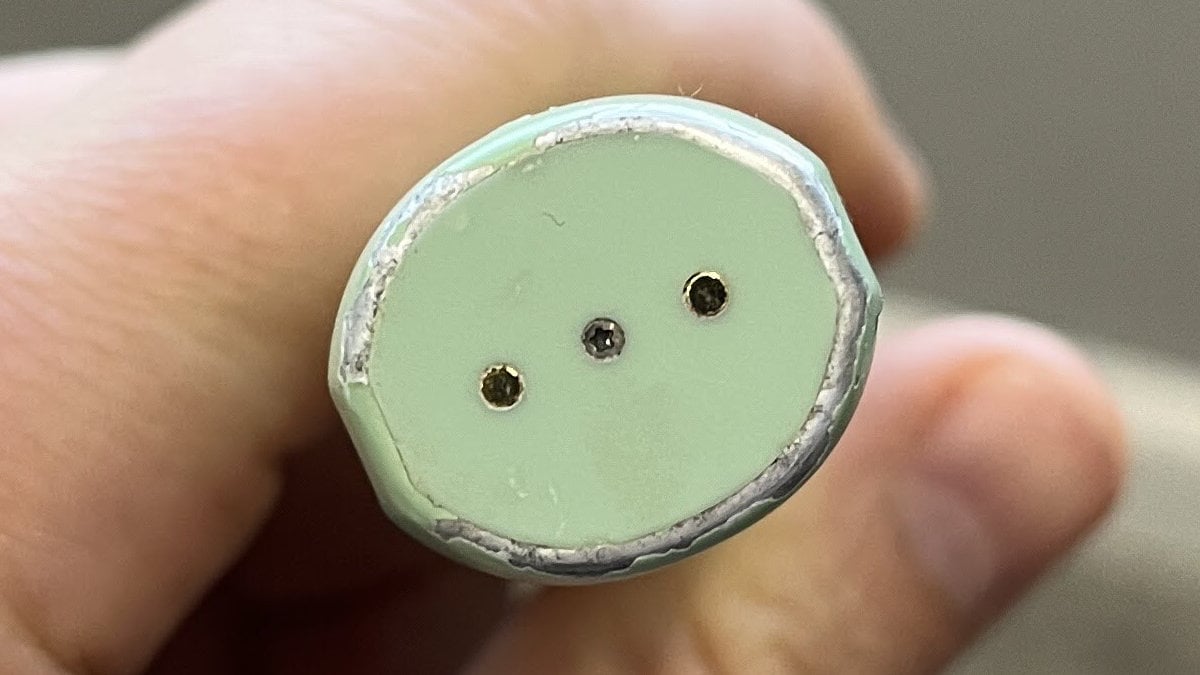
The paint coating on my SURI is bubbling or chipping
Some SURI users have reported the paint on their handle chipping or bubbling.
This is not normal, but is a known issue.
SURI have used a new coating method for the paint on the 2.0 model to help address this.
If you have a model that is within warranty, they will replace it.
We experienced this on 1 or 2 brushes we gave to family members. See an example in the image below.
Will SURI send a replacement toothbrush before I send my faulty one back?
Yes.
To ensure you’re not without a toothbrush, SURI will send a like-for-like replacement of the same model whenever possible. If the original model is no longer available, they may provide a replacement of equal or greater specification at their discretion.
The original faulty brush remains their property and must be returned to them within 30 calendar days of receiving a replacement. SURI will include a prepaid returns label and instructions for sending it back. If the faulty brush is not returned within this period, and no alternative arrangement has been agreed in writing, they may issue an invoice for the value of the replacement product.
Once they receive your returned toothbrush, SURI’s recovery team will take it apart to reuse components or recycle them responsibly.
What’s covered under the warranty?
Examples of what the warranty covers, but is not limited to are:
- The brush no longer charging or holding charge
- The battery life lasting less than the advertised time
- The brush no longer switching on or off
- The brush intermittently stops working
- The brush speeds up and slows down for no reason
The warranty does not cover cosmetic damage such as scratches, or damage caused by:
- Normal wear and tear
- Accident, misuse, dirt or water
- The product being tampered with
- Improper use
- Repairs carried out by agents not authorised by SURI
- Failure to take proper care of the product, including recharging
- The product being altered or used for commercial purposes
Is my SURI toothbrush warranty extended if they repair or replace it under warranty?
No.
Any repair or replacement of a brush handle during the standard warranty period does not qualify for an extension. Your original warranty period remains in place.